Record it once.
Make it look finished.
Record your screen and camera in the browser and get a link the moment you stop. Polish it in Studio with automatic zooms and a smooth cursor, or turn every click into a walkthrough people can follow.
- Free plan, no credit card
- Works in your browser
- Viewers need no account
One recording, three jobs
Share it fast. Make it beautiful. Teach it step by step.
Most teams juggle a quick recorder, a polishing editor and a guide builder. ClipsBat does all three from the same recording, in one tab.
A link the moment you stop.
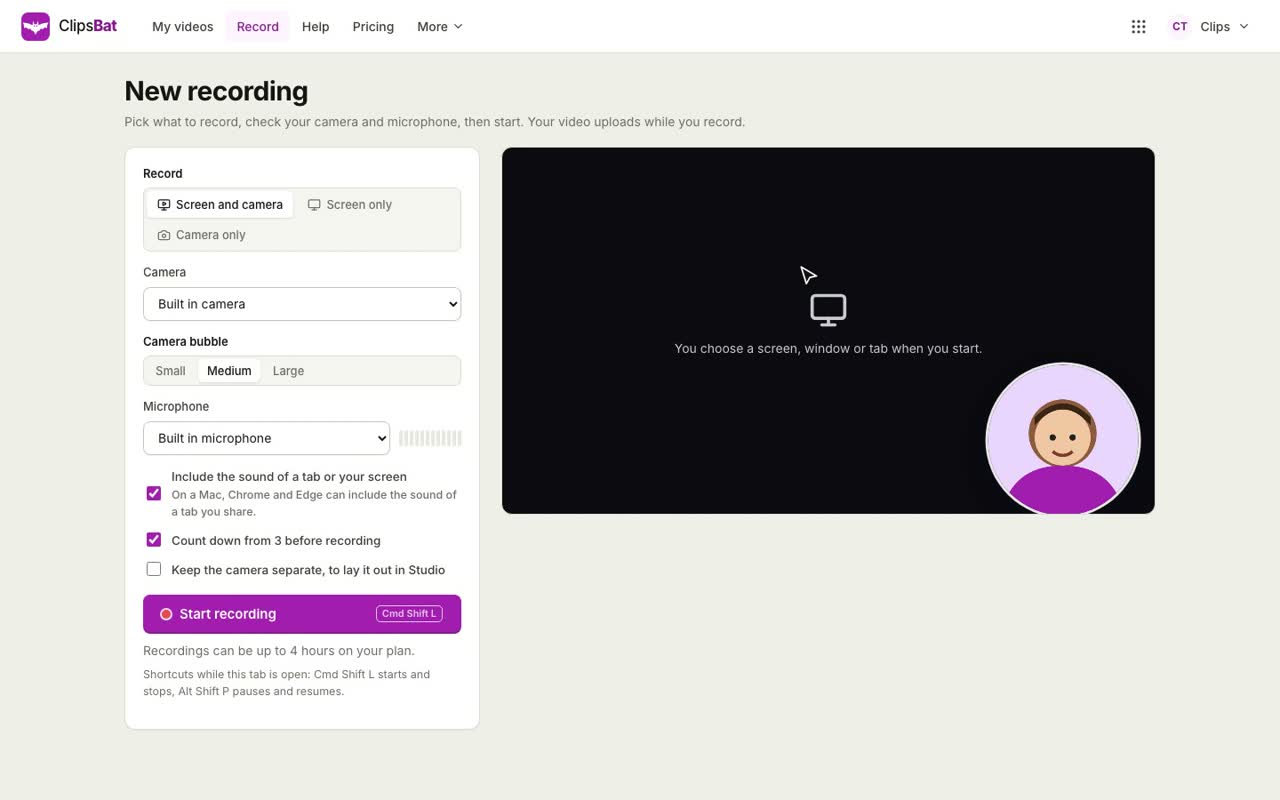
Screen, camera or both, uploaded while you talk. Viewers watch without an account, comment at the exact second, react, and click your button.
How recording works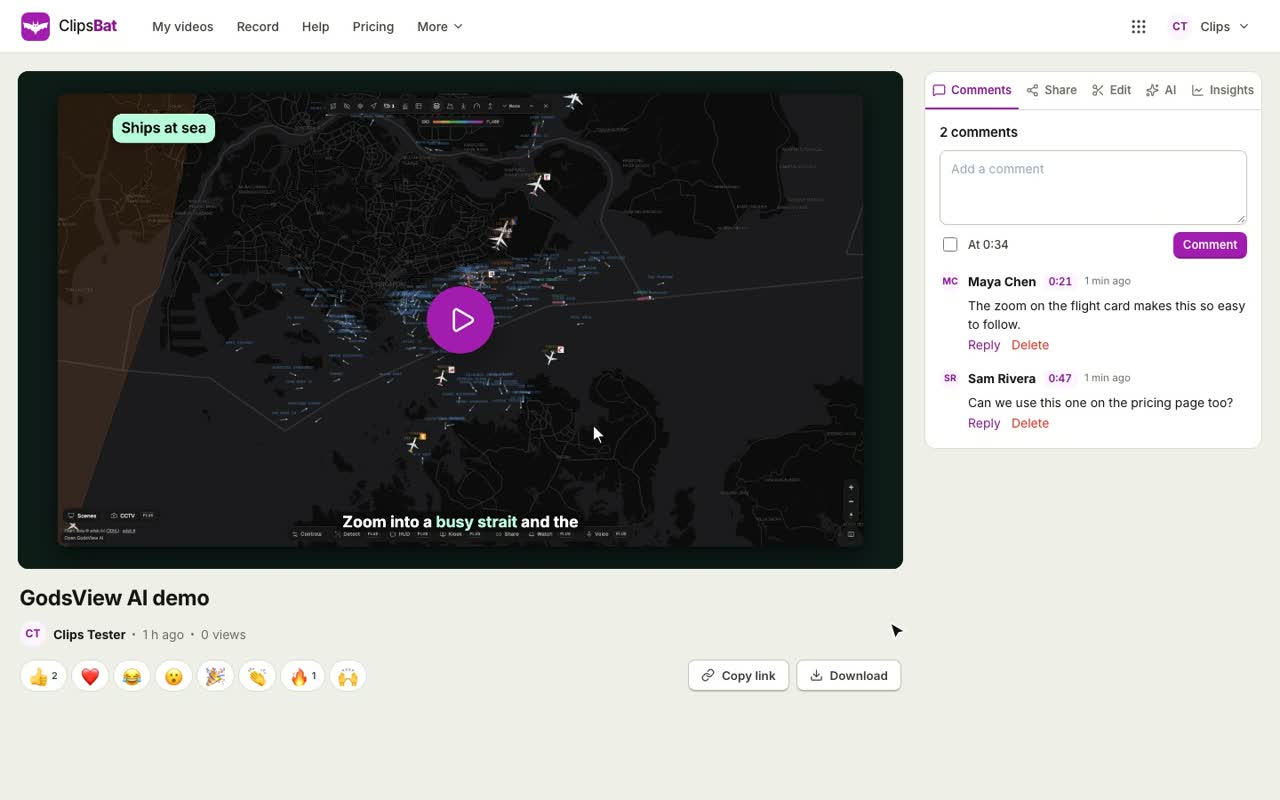
Zooms that follow every click.
A smooth, larger cursor, backgrounds, rounded corners, captions, callouts and music, then MP4 up to 4K and 60 fps, or a GIF.
Tour Studio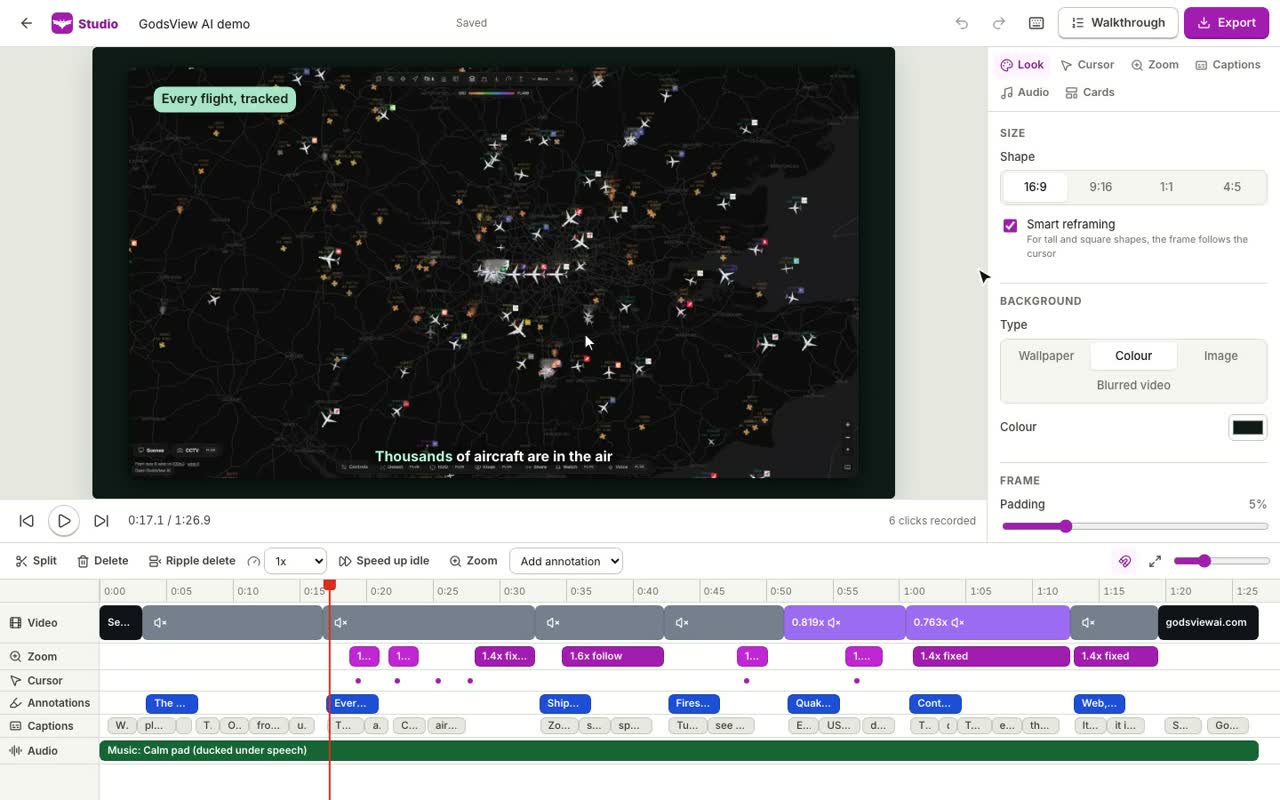
Every click becomes a step.
An interactive click through demo and a step by step guide with screenshots, ready as a page, an embed, a PDF, Markdown or HTML.
See walkthroughs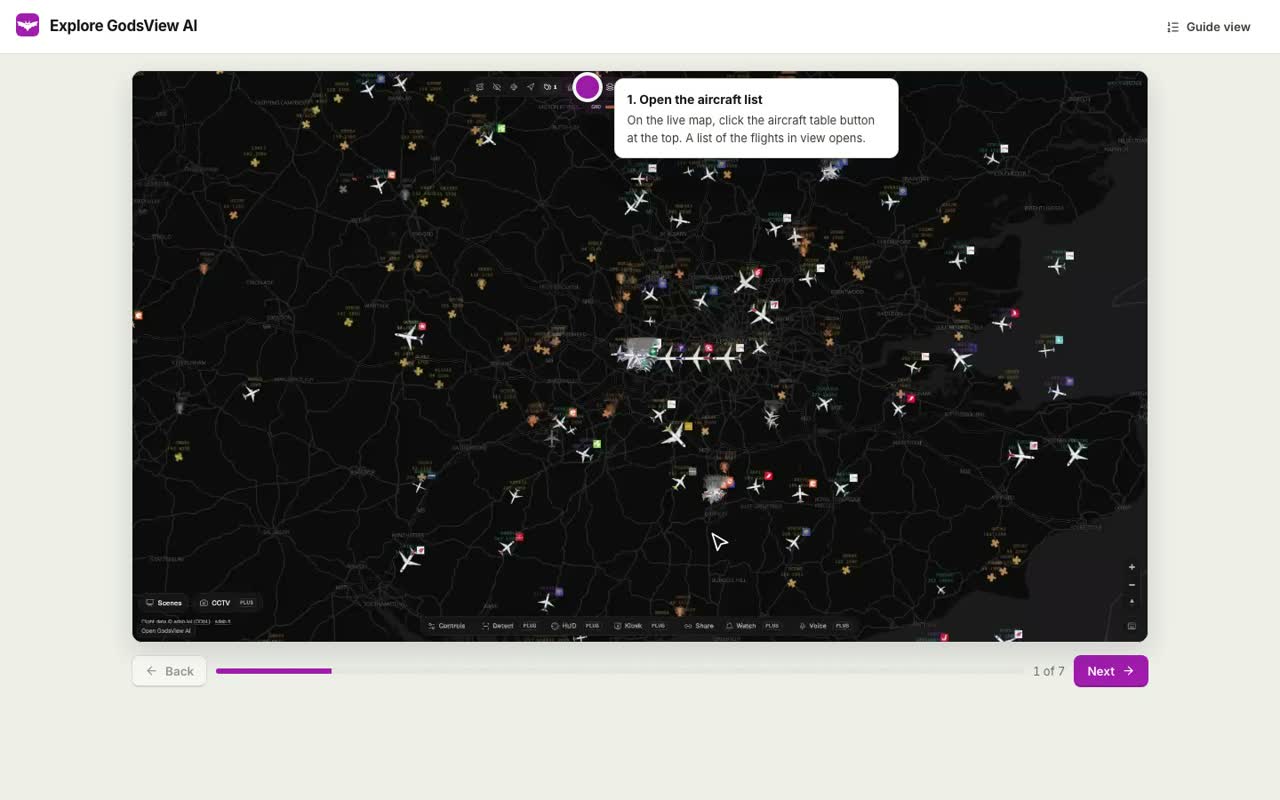
Before and after
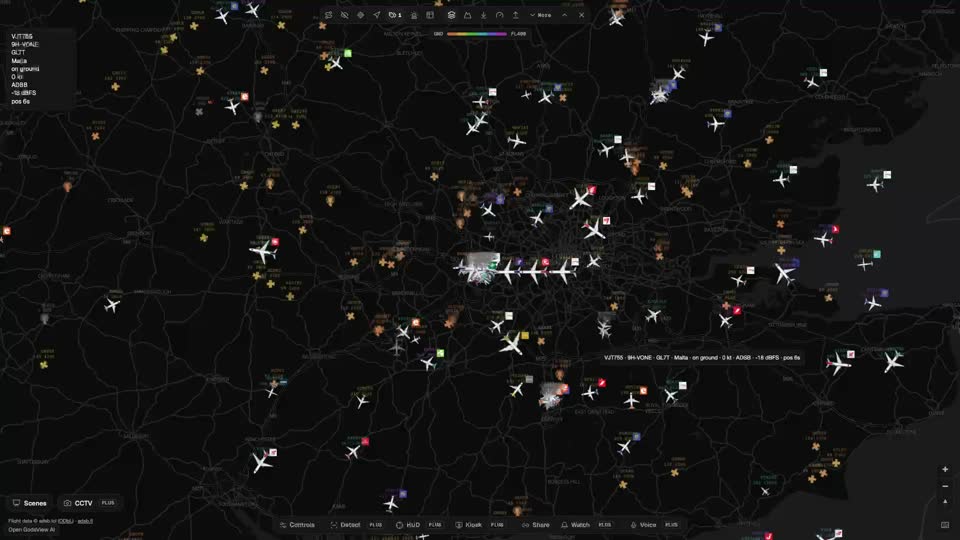
Same recording. Finished in Studio.
On the left, eight seconds of a raw tab recording. On the right, the same eight seconds after Studio: nothing was recorded again.
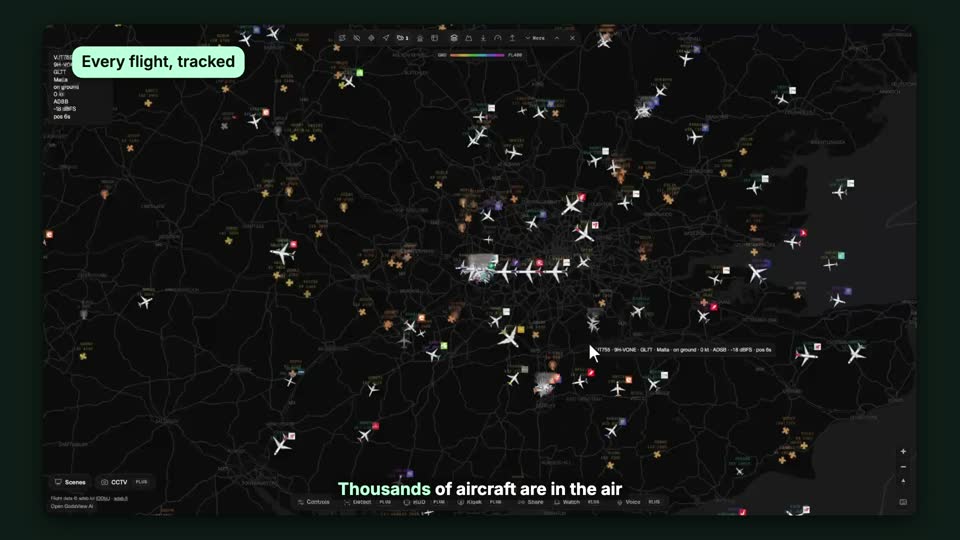
- Automatic zooms from the recorded clicks
- A smooth, enlarged cursor with click ripples
- Background, padding, rounded corners and shadow
- Callouts that pop in at the right moment
- Captions from the transcript, with the spoken word highlighted
- Voice over and music that gets quieter under speech
Record
One click. Screen, camera, or both.
Share a screen, a window or a tab with your camera in a round bubble you can drag anywhere, or record just your camera. Your video uploads as you talk, so the link is ready the moment you stop.
- Camera bubble in three sizes, drawn into the video live
- Microphone meter, device pickers, countdown, pause and restart
- A browser crash keeps everything already recorded
- Keep the camera on its own track to lay it out later in Studio
- Phones and tablets record with the camera
Share
A link that does the talking.
Every video gets a fast page with a player people like: 0.5x to 2x, captions, chapters and keyboard controls. Viewers comment at a moment, react with an emoji, and click your button to book a call.
- Anyone with the link, signed in people, your team, or a password
- A date when the link stops working, downloads on or off
- Embed code and rich previews in Slack, email and social sites
- Views, viewers, completion and a drop off curve
Studio
The polish of a studio edit, in minutes.
Studio knows where every click happened, so it zooms in where the action is and glides with the cursor. Choose a look, add annotations and captions, then export or publish to the same link.
- Automatic zooms from clicks and typing, each one editable on the timeline
- Smooth enlarged cursor, click ripples and shortcut keys on screen
- Spotlight, highlight, blur, arrows, callouts and step badges
- 16:9, 9:16, 1:1 and 4:5 with framing that follows the cursor
- Cut by deleting words in the transcript, speed up idle parts
- Intro and outro cards, voice over, music ducked under speech
Walkthroughs
Every click becomes a step.
Turn a recording into an interactive walkthrough people click through at their own pace, and a step by step guide with annotated screenshots. AI can write the instructions; you can redact anything private before you share.
- One step per click, with a screenshot from just before it
- Hotspots, next and back, keyboard keys and an embed code
- Guide as a page, a PDF, Markdown or HTML
- The same privacy choices as videos
AI
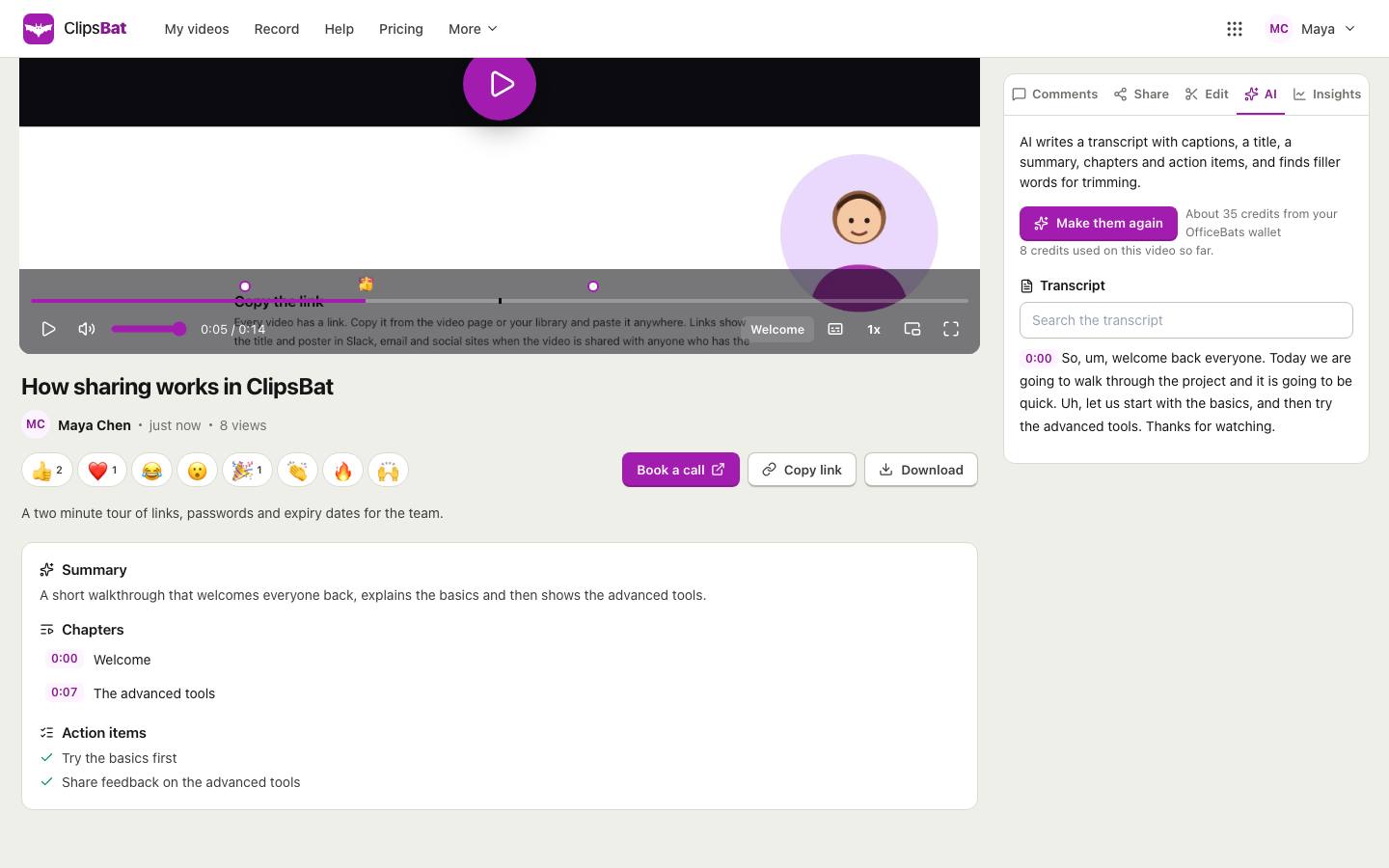
The summary writes itself.
Get a transcript with captions, a title, a summary, chapters and action items. ClipsBat also finds filler words and long silences, so you can cut them in one click without recording again.
- Captions viewers can turn on, chapters on the progress bar
- Remove silences and filler words as a trim you can undo
- Credits from your OfficeBats wallet, with the cost shown first
Insights
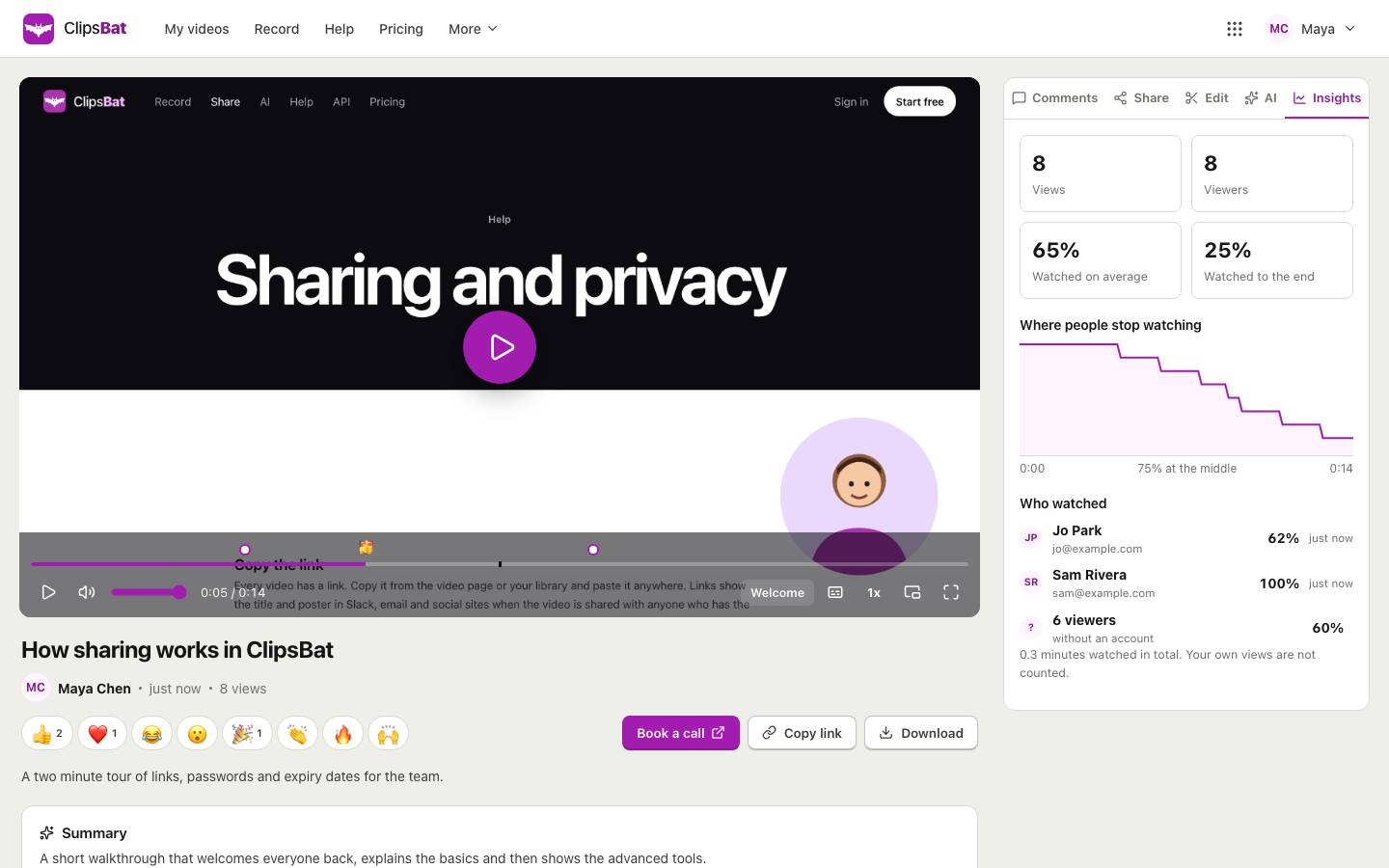
Know who watched, and where they stopped.
See views, viewers, how much of the video people watch and where they drop off. Get an email when someone watches for the first time or leaves a comment, as it happens or once a day.
- Signed in viewers by name, with how much they watched
- A drop off curve across the whole video
- Your own views never count
Chrome extension
Cursor data, without the clutter.
The free ClipsBat Recorder records a Chrome tab together with where the cursor moved, what was clicked and which shortcuts were pressed. That is what lets Studio zoom on each click and build walkthroughs on its own.
- Uploads while recording, straight to your library
- Pause and finish from the toolbar or with Alt Shift R
- Without it, Studio looks for the cursor in the picture
What the extension keeps
- Cursor movement and clicks, with the clicked button or link name
- Scrolling and the pages you visit, without their query part
- Shortcut names while a modifier key is held
What it never keeps
- The text you type
- Anything in password, card or code fields
- Other tabs, or anything when you are not recording
Made with ClipsBat
A full product demo, start to finish.
GodsView AI, a live world map, recorded with the ClipsBat Recorder extension and edited in Studio. Press play for sound.

Use cases
For anyone who explains things on a screen.
Product demos
Record the flow once, let Studio zoom in on every click, add callouts and music, and export a 4K demo for the website or a 9:16 cut for social.
Studio, 4K export, 9:16
Onboarding
Welcome new people with a short video, then hand them a walkthrough they can click through at their own pace and a PDF guide to keep.
Walkthroughs, PDF guides
Customer support
Answer with a link instead of a long email. Show the exact steps, redact private details, and embed the guide in your help center.
Guides, redaction, embeds
Sales
Send a personal video with your face in the bubble and a Book a call button, then see who watched and how far.
Camera bubble, button, insights
Bug reports
Show the problem with the clicks and pages recorded alongside it. Developers comment at the exact moment it breaks.
Extension events, timestamped comments
Tutorials and courses
Captions, chapters, shortcut keys on screen and step badges make lessons easy to follow and easy to skim.
Captions, chapters, annotations
How it compares
Three kinds of tool, one tab.
An honest look at what each kind of tool is usually built for. Quick video message tools are like Loom, desktop polish editors like Screen Studio, guide and demo builders like Scribe or Arcade.
| What you need | ClipsBat | Quick video message tools | Desktop polish editors | Guide and demo builders |
|---|---|---|---|---|
| Record screen and camera from a web page | Yes, in any desktop browser | Core feature | Usually a desktop app | Screenshots from an extension |
| Share link with comments, reactions and viewer insights | Yes | Core feature | Some | Views and clicks on demos |
| Automatic zooms on clicks, smooth cursor, backgrounds | Yes, with the free extension | Usually not | Core feature | No |
| Captions, cut by transcript, summaries and chapters | Yes, AI uses wallet credits | Often | Some | No |
| Interactive click through demo and step by step guide with PDF | Yes, from the same recording | No | No | Core feature |
| MP4 up to 4K and 60 fps, and GIF | Yes | Usually not | Core feature | Some |
| Works on Mac, Windows, Linux and ChromeOS | Yes, in the browser | Usually | Often Mac only | Usually |
| One plan that also covers documents, design, video editing and a shared Drive | Yes, OfficeBats Pro | No | No | No |
General categories, not a review of any one product. Products change often, so check each one for what it does today.
Where ClipsBat is not the best fit yet
- Cursor data comes from the extension. Automatic zooms and the drawn cursor need the ClipsBat Recorder (Chrome tabs) or a recording of the ClipsBat tab. For other recordings Studio looks for the cursor in the picture, which is best effort.
- The extension is not in the Chrome Web Store yet. For now it installs in a minute as an unpacked extension, with steps in the help.
- Export runs in your browser. It needs a recent Chrome, Edge or Safari on a computer, and long 4K exports take a while on slower machines.
- Recordings are kept at up to 1080p and 30 fps. 4K and 60 fps exports draw text, the cursor and backgrounds sharper and smoother, but do not add detail the recording did not have.
Trust and security
Private by default where it matters.
You choose who watches
Anyone with the link, people signed in, your team, or a password, with an expiry date. Files are served with signed links that expire.
Typing stays private
The extension records that a key was pressed, never what you typed. Redactions in walkthroughs are blurred into the image itself.
One secure account
Sign in with OfficeBats and two factor authentication. Video passwords are stored as salted hashes, and every change checks that the video is yours.
Your recordings stay yours
Studio never overwrites the original. AI runs only when you ask, and our AI providers do not train on your videos under our agreements.
Pricing
Start free. One plan for every Bats app.
ClipsBat uses your OfficeBats account: one plan, one AI wallet and one Drive for ClipsBat, VideoBat, DesignBat, PDFbat, DocsBat, SlidesBat, SheetsBat and Buildan.app.
Record, share and polish your first videos.
- Screen, camera and screen with camera
- Up to 25 videos
- Recordings up to 5 minutes
- Studio editor and walkthroughs
- Comments, reactions, privacy, passwords and expiry
- AI with credits from your OfficeBats wallet
Or $109.90 a year on OfficeBats.
- Unlimited videos
- Recordings up to 4 hours
- No ClipsBat link under your videos
- 5,000 AI credits a month
- The API and MCP for your tools and assistants
- 100 GB Drive shared by every Bats app
Questions, answered.
Is ClipsBat free?
Yes. Free keeps up to 25 videos with recordings up to 5 minutes each, and includes sharing, comments, privacy, Studio and walkthroughs. Pro is $10.99 a month on OfficeBats (one plan for every Bats app): unlimited videos, recordings up to 4 hours, no ClipsBat link under your videos, and API access.
Do I need to install anything?
No. ClipsBat records in Chrome, Edge, Firefox and Safari on a computer, and viewers just open the link. The free ClipsBat Recorder extension for Chrome is optional: it adds cursor and click data so Studio can zoom in on each click and build walkthroughs.
How is Studio different from the quick editor?
The quick editor on every video trims the start and end, cuts silences and filler words, and changes the poster. Studio is a full timeline: automatic zooms from clicks, a smooth enlarged cursor, backgrounds, padding, rounded corners and shadow, 16:9, 9:16, 1:1 and 4:5, spotlight, blur, callouts, step badges, shortcut keys, captions, cutting words from the transcript, intro and outro cards, voice over and music. Your original recording is always kept.
What can I export?
MP4 at 720p, 1080p or 4K and 30 or 60 frames a second, or a GIF. Frames are drawn in your browser with the same engine as the preview, so the export looks like the preview, and the sound is mixed and loudness balanced on our server. You can also publish the export to the share link and keep earlier versions. Export needs a recent Chrome, Edge or Safari on a computer.
What is a walkthrough?
A walkthrough turns a recording into steps, one per click, each with a screenshot taken just before the click. Viewers click through it at their own pace, or read it as a step by step guide you can download as a PDF or copy as Markdown or HTML. You can redact anything private; the blur is saved into the image.
Do viewers need an account?
Not for videos and walkthroughs shared with anyone who has the link. You can also limit them to people signed in to OfficeBats, to your team, or to people who know a password, and set a date when the link stops working.
What happens if my browser crashes while recording?
Your video uploads while you record, and the parts not sent yet are kept on your computer. Open ClipsBat again and it finishes the upload, so you keep everything up to the moment it stopped.
How does the AI work, and what does it cost?
AI writes a transcript with captions, a title, a summary, chapters and action items, finds filler words and silences, writes walkthrough steps and can read a voice over. It uses credits from your OfficeBats wallet, by what each job really costs, and shows the estimate first. Recording, sharing and Studio never need AI.
Does the extension see what I type?
No. It records that a key was pressed, never which characters. Shortcut names like Cmd K are kept only while a modifier key is held and never in password, card or code fields, and you can turn them off. It records only the tab you choose, only while you record.
Your next video is one click away.
Free to start, no credit card. Record now, polish it in Studio later. One OfficeBats account for every Bats app.